Receipt
Compact A5 payment receipt with an amount-paid highlight, payment method, items and taxes.
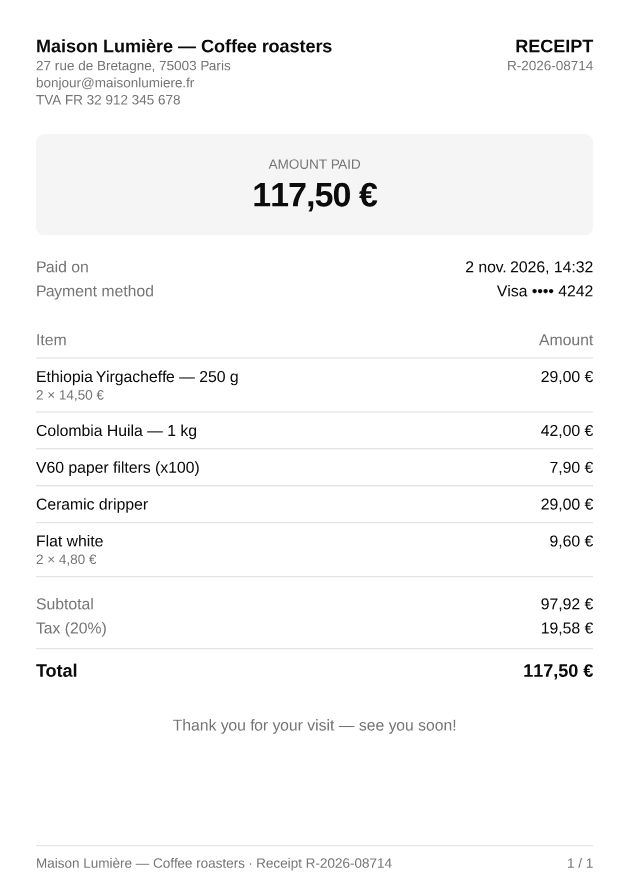
import { Receipt } from "@/components/pdf/receipt";import { exampleReceipt } from "@/components/pdf/receipt-example";
export default function ReceiptExample() {  return <Receipt data={exampleReceipt} />;}
Installation
npx shadcn add https://ui-registry.com/r/pdf/receipt.jsonThis installs receipt.tsx, a receipt-example.ts with sample data, and the components it uses: Heading, Page Footer, Separator and Table.
Usage
import { Receipt } from "@/components/pdf/receipt";
<Receipt data={{ number: "R-2026-08714", paidAt: new Date("2026-11-02T14:32:00+01:00"), timeZone: "Europe/Paris", paymentMethod: "Visa •••• 4242", currency: "EUR", locale: "fr-FR", taxRate: 20, pricesIncludeTax: true, merchant: { name: "Maison Lumière — Coffee roasters", lines: ["27 rue de Bretagne, 75003 Paris", "TVA FR 32 912 345 678"], }, items: [ { description: "Ethiopia Yirgacheffe — 250 g", quantity: 2, unitPrice: 14.5 }, { description: "Ceramic dripper", quantity: 1, unitPrice: 29 }, ], message: "Thank you for your visit — see you soon!", }} theme={{ "--color-muted": "#fdf4e7" }}/>Receipt renders a full <Document>: pass it straight to PDFViewer, renderToBuffer, etc.
pricesIncludeTax: retail prices usually include tax (TTC). Whentrue, the total is the sum of the items and the tax is extracted from it; otherwise the tax is added on top. Subtotal and tax are rounded to the currency's minor unit so they always add up to the printed total.paymentMethodis free text:"Visa •••• 4242","Apple Pay","Cash"…timeZone(IANA name) sets the time zone used to printpaidAt. Set it when rendering on a server, which usually runs in UTC.- Items with a quantity other than 1 get a muted
2 × 14,50 €line under their description.
Why A5?
A receipt is short, so an A4 page would be mostly empty. A5 (148 × 210 mm) keeps the receipt compact and readable on a phone, while still printing correctly on any office printer (two per A4 sheet, or scaled up). A narrow thermal-printer format (80 mm wide) would force a fixed, very tall page height in PDF, which handles long item lists poorly: on A5, extra items simply flow onto more pages.
Send it by email
import { renderToBuffer } from "@ui-registries/pdf";import { Receipt } from "@/components/pdf/receipt";
export async function receiptAttachment(payment: Payment) {  const data = toReceiptData(payment); // your mapping  const content = await renderToBuffer(<Receipt data={data} />);  return { content, filename: `${data.number}.pdf` };}
In Next.js, add @react-pdf/renderer to serverExternalPackages in next.config.
Translate labels
All visible labels can be overridden:
<Receipt data={data} labels={{ receipt: "Reçu", amountPaid: "Montant payé", paidAt: "Payé le", paymentMethod: "Moyen de paiement", item: "Article", amount: "Montant", subtotal: "Total HT", tax: "TVA", total: "Total TTC", }}/>Amounts and dates are formatted with Intl using data.locale and data.currency.
Multi-page
A typical receipt fits on a single page. Long item lists flow onto more pages: the table header and the footer (with page numbers) are repeated, rows are never split, and the totals block stays in one piece.