Quote
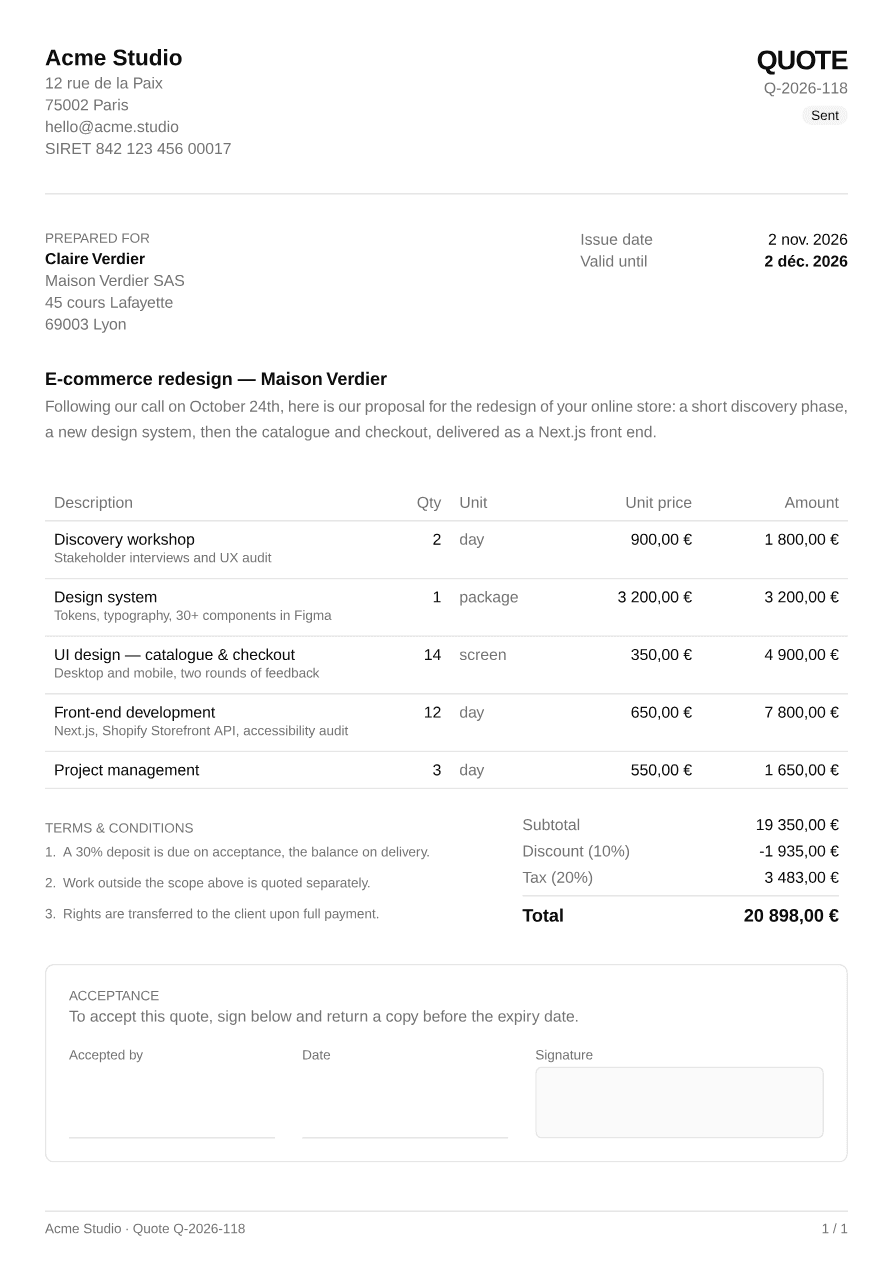
Quote / estimate with project intro, line items, discount, taxes, terms and a signature block.
import { Quote } from "@/components/pdf/quote";import { exampleQuote } from "@/components/pdf/quote-example";
export default function QuoteExample() {  return <Quote data={exampleQuote} />;}
Installation
npx shadcn add https://ui-registry.com/r/pdf/quote.jsonThis installs quote.tsx, a quote-example.ts with sample data, and the components it uses: Badge, Heading, Page Footer, Separator and Table.
Usage
import { Quote } from "@/components/pdf/quote";
<Quote data={{ number: "Q-2026-118", issueDate: new Date("2026-11-02"), validUntil: new Date("2026-12-02"), status: "sent", currency: "EUR", locale: "fr-FR", taxRate: 20, discount: { type: "percent", value: 10 }, from: { name: "Acme Studio", lines: ["12 rue de la Paix", "75002 Paris"] }, to: { name: "Claire Verdier", lines: ["Maison Verdier SAS", "69003 Lyon"] }, project: "E-commerce redesign — Maison Verdier", intro: "Following our call on October 24th, here is our proposal…", items: [ { description: "Discovery workshop", detail: "Stakeholder interviews and UX audit", quantity: 2, unit: "day", unitPrice: 900, }, { description: "UI design — catalogue & checkout", quantity: 14, unit: "screen", unitPrice: 350 }, ], terms: [ "A 30% deposit is due on acceptance, the balance on delivery.", "Work outside the scope above is quoted separately.", ], }} theme={{ "--color-primary": "#0073e6" }}/>Quote renders a full <Document>: pass it straight to PDFViewer, renderToBuffer, etc.
projectandintroare optional: without them, the line items follow the parties directly.detailadds a muted secondary line under an item's description. The Unit column only appears when at least one item has aunit.discountis either{ type: "percent", value: 10 }or a fixed{ type: "amount", value: 500 }. Tax is computed on the discounted subtotal.status(draft,sent,accepted,declined,expired) shows a badge under the quote number.
Generate it on the server
import { renderToBuffer } from "@ui-registries/pdf";import { Quote } from "@/components/pdf/quote";
export async function GET(_req: Request, { params }: { params: Promise<{ id: string }> }) {  const { id } = await params;  const data = await getQuote(id); // your data source  const buffer = await renderToBuffer(<Quote data={data} />);  return new Response(buffer, {    headers: {      "Content-Type": "application/pdf",      "Content-Disposition": `inline; filename="${data.number}.pdf"`,    },  });}
In Next.js, add @react-pdf/renderer to serverExternalPackages in next.config.
Translate labels
All visible labels can be overridden:
<Quote data={data} labels={{ quote: "Devis", preparedFor: "Établi pour", issueDate: "Date d'émission", validUntil: "Valable jusqu'au", description: "Description", quantity: "Qté", unit: "Unité", unitPrice: "Prix unitaire", amount: "Montant", subtotal: "Total HT", discount: "Remise", tax: "TVA", total: "Total TTC", terms: "Conditions", acceptance: "Bon pour accord", acceptanceNote: "Pour accepter ce devis, signez ci-dessous et retournez-en une copie avant sa date d'expiration.", acceptedBy: "Nom du signataire", date: "Date", signature: "Signature", status: { draft: "Brouillon", sent: "Envoyé", accepted: "Accepté", declined: "Refusé", expired: "Expiré", }, }}/>Amounts and dates are formatted with Intl using data.locale and data.currency.
Multi-page
Long quotes flow onto several pages: the table header and the footer (with page numbers) are repeated, rows and terms clauses are never split, and the totals block stays in one piece. The acceptance block is never split either: if it doesn't fit at the bottom of a page, it moves to the next one as a whole, so the signature always sits under the full acceptance note.