Typeset Markdown
Renders Markdown into a PDF with the Typeset components. Useful for content that already lives as text: terms and conditions from a CMS, release notes, AI-generated reports.
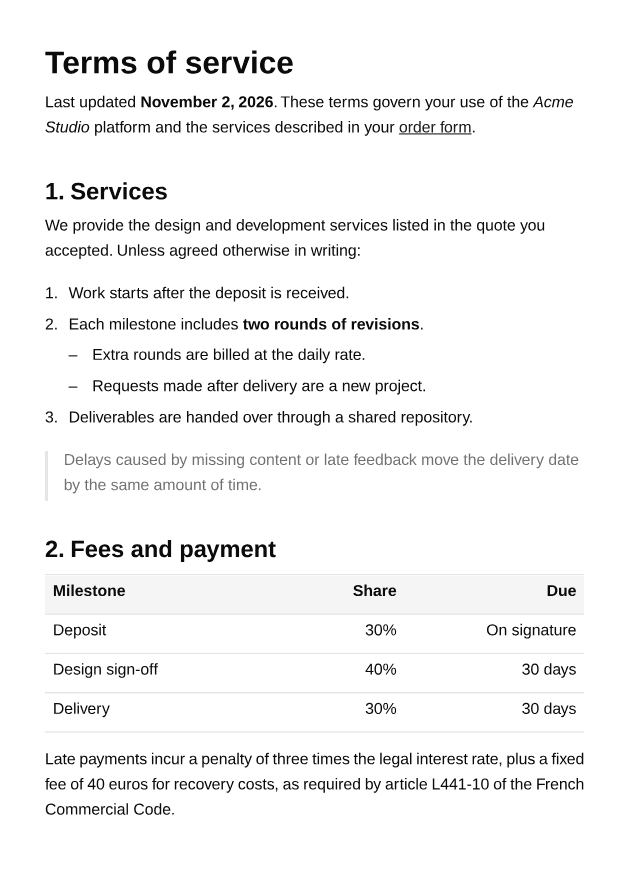
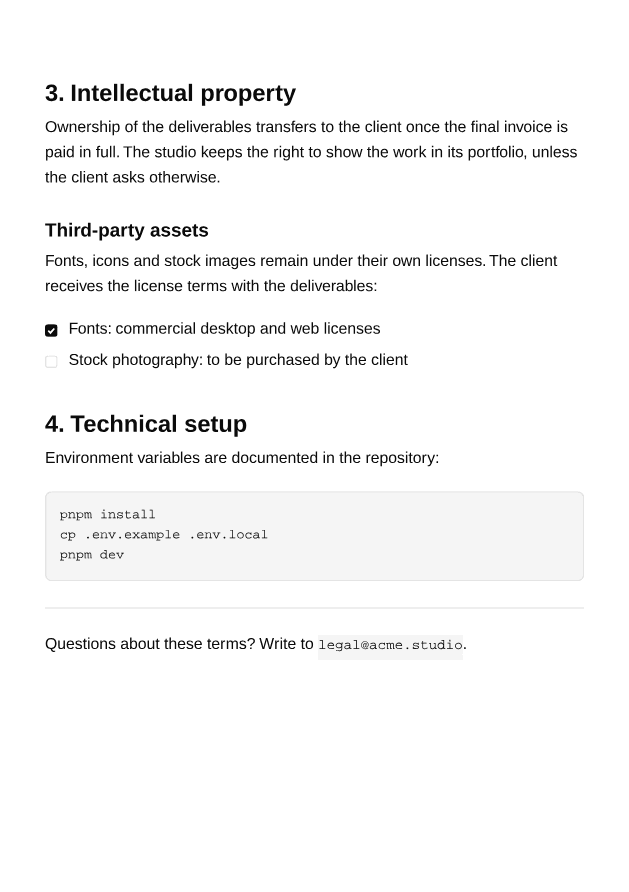
2 pagesOpen PDF ↗
typeset-markdown-example.tsx
import { Document, Page } from "@ui-registries/pdf";import { TypesetMarkdown } from "@/components/pdf/typeset-markdown";
const TERMS_MARKDOWN = `# Terms of service
Last updated **November 2, 2026**. These terms govern your use of the *Acme Studio* platform and the services described in your [order form](https://acme.studio/order).
## 1. Services
We provide the design and development services listed in the quote you accepted. Unless agreed otherwise in writing:
1. Work starts after the deposit is received.2. Each milestone includes **two rounds of revisions**.   - Extra rounds are billed at the daily rate.   - Requests made after delivery are a new project.3. Deliverables are handed over through a shared repository.
> Delays caused by missing content or late feedback move the delivery date by the same amount of time.
## 2. Fees and payment
| Milestone | Share | Due || :-- | --: | --: || Deposit | 30% | On signature || Design sign-off | 40% | 30 days || Delivery | 30% | 30 days |
Late payments incur a penalty of three times the legal interest rate, plus a fixed fee of 40 euros for recovery costs, as required by article L441-10 of the French Commercial Code.
## 3. Intellectual property
Ownership of the deliverables transfers to the client once the final invoice is paid in full. The studio keeps the right to show the work in its portfolio, unless the client asks otherwise.
### Third-party assets
Fonts, icons and stock images remain under their own licenses. The client receives the license terms with the deliverables:
- [x] Fonts: commercial desktop and web licenses- [ ] Stock photography: to be purchased by the client
## 4. Technical setup
Environment variables are documented in the repository:
\`\`\`bashpnpm installcp .env.example .env.localpnpm dev\`\`\`
---
Questions about these terms? Write to \`legal@acme.studio\`.`;
export default function TypesetMarkdownExample() { return ( <Document> <Page className="bg-background px-10 pt-10 pb-12" size="A5"> <TypesetMarkdown>{TERMS_MARKDOWN}</TypesetMarkdown> </Page> </Document> );}Installation
Terminal
npx shadcn add https://ui-registry.com/r/pdf/typeset-markdown.jsonThis installs typeset-markdown.tsx, the typeset component it uses, and marked to parse the Markdown.
Usage
tsx
import { Document, Page } from "@ui-registries/pdf";import { TypesetMarkdown } from "@/components/pdf/typeset-markdown";
const terms = await getTerms(); // a Markdown string
<Document>  <Page size="A4" className="p-12">    <TypesetMarkdown preset="compact">{terms}</TypesetMarkdown>  </Page></Document>
TypesetMarkdown takes the same props as Typeset (preset, size, leading, flow, fonts, className…).
Supported syntax
CommonMark plus the GitHub extensions:
- Headings (levels 5 and 6 render as level 4), paragraphs, line breaks
- Bold, italic,
strikethrough,inline code, links - Ordered, unordered and nested lists; task lists (
- [x]) with a drawn checkbox - Quotes, code blocks, horizontal rules
- Tables with column alignment (
:--,:-:,--:) - Images on their own line (inline images become their alt text)
Raw HTML is ignored.
Custom components
Replace any element with your own component, like react-markdown:
tsx
import { Text } from "@ui-registries/pdf";import { TypesetMarkdown } from "@/components/pdf/typeset-markdown";
<TypesetMarkdown  components={{    link: ({ children, href }) => (      <Text className="text-primary">        {children} ({href})      </Text>    ),  }}>  {markdown}</TypesetMarkdown>
Keys: heading, paragraph, list, listItem, blockquote, codeBlock, rule, image, table, tableRow, tableCell, strong, em, del, code, link.