Typeset
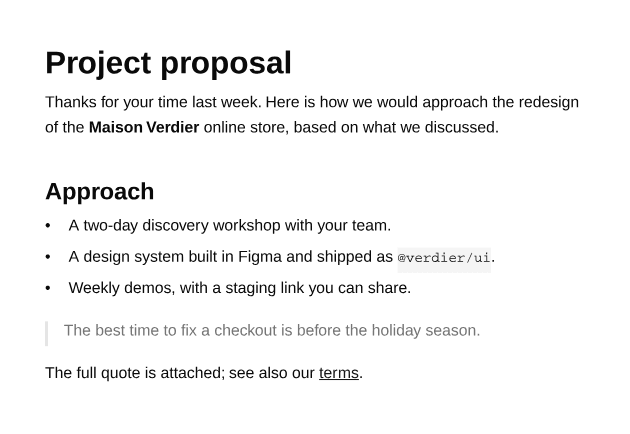
Rhythm for long-form content — terms, letters, articles, generated text — after shadcn's Typeset. Three tokens drive every size and space, so a whole document changes scale from one place.
import { Document, Page } from "@ui-registries/pdf";import {  Typeset,  TypesetBlockquote,  TypesetCode,  TypesetHeading,  TypesetLink,  TypesetList,  TypesetListItem,  TypesetParagraph,  TypesetStrong,} from "@/components/pdf/typeset";
export default function TypesetExample() { return ( <Document> <Page className="gap-6 bg-background p-10 text-sm" size={{ width: 420 }}> <Typeset> <TypesetHeading level={1}>Project proposal</TypesetHeading> <TypesetParagraph> Thanks for your time last week. Here is how we would approach the redesign of the <TypesetStrong>Maison Verdier</TypesetStrong> online store, based on what we discussed. </TypesetParagraph> <TypesetHeading level={2}>Approach</TypesetHeading> <TypesetList> <TypesetListItem> <TypesetParagraph> A two-day discovery workshop with your team. </TypesetParagraph> </TypesetListItem> <TypesetListItem> <TypesetParagraph> A design system built in Figma and shipped as{" "} <TypesetCode>@verdier/ui</TypesetCode>. </TypesetParagraph> </TypesetListItem> <TypesetListItem> <TypesetParagraph> Weekly demos, with a staging link you can share. </TypesetParagraph> </TypesetListItem> </TypesetList> <TypesetBlockquote> <TypesetParagraph> The best time to fix a checkout is before the holiday season. </TypesetParagraph> </TypesetBlockquote> <TypesetParagraph> The full quote is attached; see also our{" "} <TypesetLink href="https://acme.studio/terms">terms</TypesetLink>. </TypesetParagraph> </Typeset> </Page> </Document> );}Installation
npx shadcn add https://ui-registry.com/r/pdf/typeset.jsonTo write the content in Markdown instead, see Typeset Markdown.
Usage
import {  Typeset,  TypesetHeading,  TypesetList,  TypesetListItem,  TypesetParagraph,  TypesetStrong,} from "@/components/pdf/typeset";
<Page size="A4" className="p-12"> <Typeset preset="docs"> <TypesetHeading level={1}>Project proposal</TypesetHeading> <TypesetParagraph> Here is how we would approach the redesign of the{" "} <TypesetStrong>Maison Verdier</TypesetStrong> online store. </TypesetParagraph> <TypesetHeading level={2}>Approach</TypesetHeading> <TypesetList> <TypesetListItem> <TypesetParagraph>A two-day discovery workshop.</TypesetParagraph> </TypesetListItem> <TypesetListItem> <TypesetParagraph>Weekly demos on a staging link.</TypesetParagraph> </TypesetListItem> </TypesetList> </Typeset></Page>Tokens
| Token | Meaning | docs default |
|---|---|---|
size | Base font size, in pt | 10.5 |
leading | Line height, as a multiple of the font size | 1.6 |
flow | Space between blocks, as a multiple of size | 1.1 |
fonts | { body, heading, mono } font families | Helvetica, Helvetica, Courier |
Headings, code and tables derive their sizes from these: an h2 is 1.5 × size, the space above it 2 × flow. Pass any token to override the preset:
<Typeset preset="reading" size={12} flow={1.5}>Fonts registered with defineFont work too: fonts={{ body: inter.family }}.
Presets
| Preset | For | size / leading / flow |
|---|---|---|
docs | Documentation, reports (default) | 10.5 / 1.6 / 1.1 |
compact | Terms and conditions, appendices, fine print | 8.5 / 1.45 / 0.8 |
reading | Letters, articles — serif body (Times) | 11.5 / 1.7 / 1.3 |
large | Covers, short documents | 13 / 1.55 / 1.25 |
Presets live in typesetPresets at the top of the file: edit them or add your own.
Elements
| Component | Element |
|---|---|
TypesetHeading | Heading, level 1 to 4 |
TypesetParagraph | Paragraph |
TypesetList, TypesetListItem | List — ordered, start; items accept a custom marker |
TypesetBlockquote | Quote |
TypesetCodeBlock | Code block (children is the code string) |
TypesetTable, TypesetTableRow, TypesetTableCell | Table — header rows, cell align |
TypesetRule | Horizontal rule |
TypesetImage | Image, fitted to the width |
TypesetStrong, TypesetEm, TypesetDel, TypesetCode, TypesetLink | Inline text, inside a paragraph |
Every block component takes className and style; colors come from the theme (foreground, muted-foreground, border, muted, primary).
Spacing and page breaks
Like Typeset, spacing only uses a top margin: the first block of a flow has none, and the block right after a heading gets half the usual space, so headings stay close to their content. Wrap your own containers in TypesetFlow to get the same behavior.
- Headings move to the next page when fewer than three lines would follow them.
- Paragraphs keep at least two lines together at the bottom and top of a page (orphans and widows).
- List items and table rows never split; table header rows repeat on every page the table spans.