Table
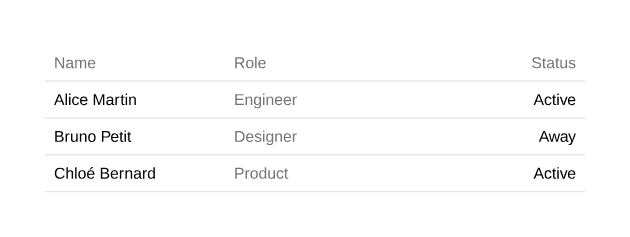
Table with a header that repeats on every page.
1 pageOpen PDF ↗
table-example.tsx
import { Document, Page } from "@ui-registries/pdf";import {  Table,  TableBody,  TableCell,  TableHead,  TableHeader,  TableRow,} from "@/components/pdf/table";
const rows = [  { name: "Alice Martin", role: "Engineer", status: "Active" },  { name: "Bruno Petit", role: "Designer", status: "Away" },  { name: "Chloé Bernard", role: "Product", status: "Active" },];
export default function TableExample() { return ( <Document> <Page className="gap-6 bg-background p-10 text-sm" size={{ width: 420 }}> <Table> <TableHeader> <TableRow className="border-b-0"> <TableHead>Name</TableHead> <TableHead>Role</TableHead> <TableHead className="text-right">Status</TableHead> </TableRow> </TableHeader> <TableBody> {rows.map((row) => ( <TableRow key={row.name}> <TableCell className="font-medium">{row.name}</TableCell> <TableCell className="text-muted-foreground"> {row.role} </TableCell> <TableCell className="text-right">{row.status}</TableCell> </TableRow> ))} </TableBody> </Table> </Page> </Document> );}Installation
Terminal
npx shadcn add https://ui-registry.com/r/pdf/table.jsonUsage
tsx
import {  Table,  TableBody,  TableCell,  TableHead,  TableHeader,  TableRow,} from "@/components/pdf/table";
<Table> <TableHeader> <TableRow className="border-b-0"> <TableHead className="flex-[2]">Name</TableHead> <TableHead className="text-right">Status</TableHead> </TableRow> </TableHeader> <TableBody> {rows.map((row) => ( <TableRow key={row.id}> <TableCell className="flex-[2]">{row.name}</TableCell> <TableCell className="text-right">{row.status}</TableCell> </TableRow> ))} </TableBody></Table>Page breaks
TableHeaderis repeated at the top of each page the table spans. Passrepeat={false}to disable it.- A
TableRownever splits across two pages.
Column widths
Cells are flex-1 by default, so columns share the width equally. Use the same class on the header and body cells of a column to resize it: flex-[2], w-20, w-1/4…
Strings and numbers inside TableHead / TableCell are wrapped in a Text automatically. Pass any element (a Badge, a Block…) for richer content.